Service Level Agreements: Catching a Breach Before the Customer Does
There is a moment of painful embarrassment that almost every operations or customer service director has experienced.
An email lands from a key commercial client: "We submitted an urgent ticket regarding our logistics integration yesterday morning at 9:00 AM. Your contract commits to a four-hour response window. It has now been over twenty-four hours, and no one has responded. What is happening?"
Immediately, the internal scramble begins.
Managers open support dashboards, search through assigned queues, and discover that the ticket was assigned to an engineer who went on sick leave, or was misclassified as low priority by an automated routing rule, or sat unnoticed because the team was overwhelmed by a batch of routine queries.
Apology emails are drafted. Service level agreement (SLA) penalty credits are calculated and conceded. The client's faith in the company's operational capability takes a serious, lasting hit.
In modern B2B service delivery, a missed SLA is far more expensive to explain, apologize for, and commercially remediate than it is to prevent. Yet most organizations continue to manage SLAs through rear-view-mirror reporting—reviewing SLA breaches in a weekly management meeting long after the client has experienced the failure.
Managing SLAs through historical reports guarantees recurring customer friction. Preventing breaches requires active, real-time monitoring that watches the countdown timer on every single open commitment and intervenes before the clock runs out.
The True Cost of Rear-View SLA Management
When an organization only discovers SLA breaches after they occur, the commercial damage extends far beyond a single frustrated email:
1. Direct Contractual Financial Penalties
Enterprise contracts across Europe, Singapore, Malaysia, and the Gulf routinely include explicit SLA penalty clauses. If response times or incident resolution windows exceed agreed thresholds, the client is contractually entitled to service credits, rebates, or invoice discounts. In large managed services or supply chain contracts, these credits can quietly erode thousands of euros in operational profit margin every quarter.
2. High-Stress Firefighting and Prioritization Distortion
When a customer escalates an SLA breach directly to executive leadership, the internal team drops everything to address it. Normal operational sequencing is thrown out the window. Staff rush to solve the escalated issue under artificial pressure, which inevitably causes other ongoing, quiet tickets to stall—triggering the next wave of SLA breaches in a vicious operational cycle.
3. Renewal Vulnerability and Customer Churn
Commercial clients rarely leave a vendor over a single technical glitch; they leave when they feel neglected. A client who regularly has to point out that their contractual commitments are being missed begins to look for alternatives months before contract renewal discussions begin. When competitors pitch with promises of dedicated, reliable service, the frustrated client listens.
Why Standard Ticketing Dashboards Fail to Stop Breaches
Almost every modern enterprise uses a ticketing or workflow system that tracks SLAs. Yet breaches happen every day. Why?
The breakdown occurs because standard software records SLAs passively rather than enforcing them actively:
1. Passive Color-Coding
Most helpdesk tools simply change a ticket's visual tag from green to red when an SLA is breached. But this requires an operational coordinator to be actively staring at that specific queue at that specific moment. If the queue has two hundred active tickets across four screens, a silent color change in row seventy-two goes completely unnoticed.
2. Static Classification Errors
SLAs are governed by contractual definitions: an issue affecting a client's core production line has a one-hour SLA, while a general configuration query has a twenty-four-hour SLA. If an incoming ticket is misclassified during intake, it is assigned the wrong timer. The clock ticks away quietly according to low-priority rules, while the customer sits with a mission-critical breakdown.
3. Lack of Work-in-Progress Velocity Tracking
A passive tool only checks whether the final deadline has passed. It cannot tell whether work is actually progressing. A ticket with an eight-hour SLA that has sat untouched for seven hours is statistically guaranteed to breach, but a standard system treats it as "healthy" until the 8-hour-and-1-second mark when the failure is already permanent.
The Mechanics of Proactive SLA Interception
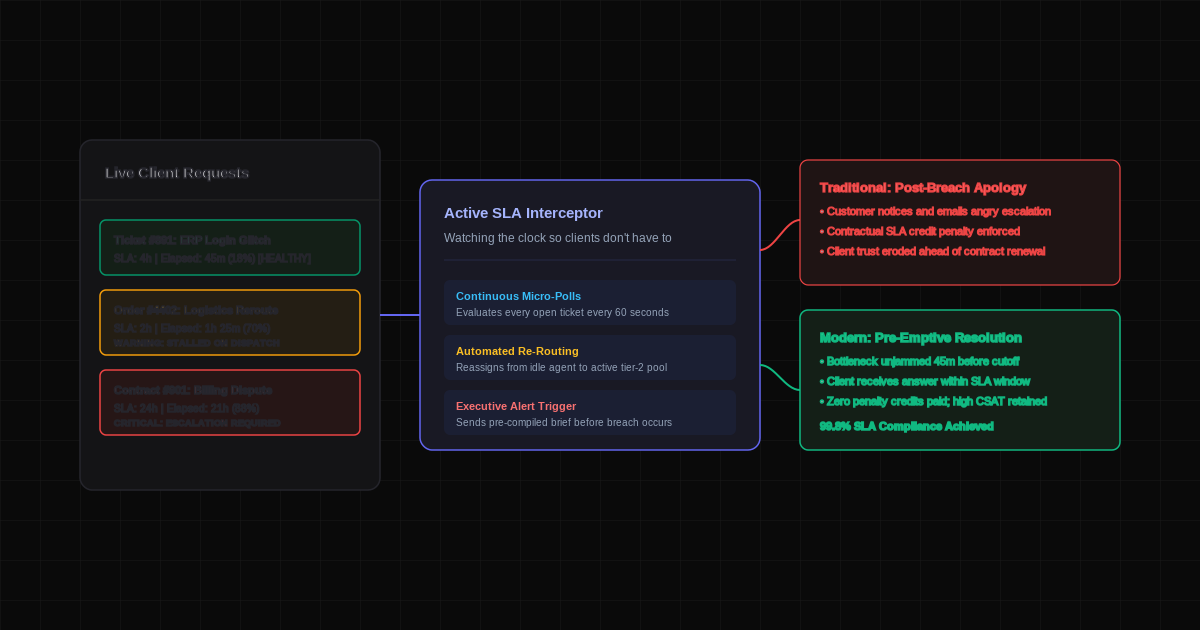
Preventing SLA breaches requires shifting from passive reporting to active, event-driven sla monitoring.
An effective breach interception architecture continuously tracks velocity, detects bottlenecks early, and executes automated escalations while there is still ample time to resolve the issue:
[Incoming Request] → Contractual SLA Tagged (e.g. 4-hour window)
        ↓
[Continuous Countdown Tracking] (Monitored every 60 seconds)
        ↓
[Threshold Trigger: 50% Elapsed Time] → (Checks if agent has touched ticket)
        ↓
[Threshold Trigger: 75% Elapsed Time] → (Automated re-routing & priority bump)
        ↓
[Threshold Trigger: 85% Warning] → (Pre-compiled mobile brief to Team Lead)
        ↓
[Resolution Delivered to Client] → (Zero Breaches, Zero Credits Conceded)
Stage 1: Contract-Aware Dynamic Tagging
The moment an email, portal request, or system alert enters the organization, the system matches the sender against the company's active contract registry.
It does not rely on manual triage to set the priority level. It identifies the client's tier, extracts the exact contractual response and resolution commitments, and attaches dynamic, deterministic countdown timers directly to the job.
If the incoming communication contains urgent semantic indicators—such as "system offline", "shipment blocked", or "line halted"—the system overrides standard routing and applies the highest-tier emergency SLA immediately.
Stage 2: Elapsed Velocity Monitoring
Instead of checking tickets once an hour, the monitoring layer continuously calculates elapsed time versus expected task progress:
- First-Response Gate: If a ticket requires a four-hour initial response, the system does not wait until hour three to check progress. At the two-hour mark (fifty percent of the window), it checks whether an assigned agent has actively reviewed the file.
- Resolution Velocity Gate: For complex operational issues requiring multi-hour investigation, the system tracks milestones. Has an engineer been assigned? Have diagnostic logs been gathered? Has an update been posted?
If a task shows zero activity as its countdown timer reaches defined operational thresholds (such as 60% or 75% of total allowable time), the system recognizes that the current assignee is unavailable or blocked.
Stage 3: Automated Work Re-Routing
When an impending breach is detected, the system does not simply send an unread email alert into an already cluttered inbox. It takes automated operational action:
- It unassigns the stalled task from the inactive queue.
- It evaluates the live capacity of available team members across the organization.
- It re-routes the task to an active specialist, placing it at the absolute top of their working queue with a highlighted "Impending SLA Risk" priority flag.
The workflow unjams itself programmatically, without requiring manual intervention from a manager.
Stage 4: High-Context Manager Intervention
If a task reaches eighty-five percent of its allowable SLA window and remains unresolved due to genuine technical complexity, the system escalates directly to an operations lead or department head.
Crucially, it does not send a generic ping saying "Ticket #904 is running late." It prepares a pre-compiled executive decision brief delivered via direct messaging (such as Slack, Teams, or SMS):
- Client & Stake: "Enterprise Client Apex Logistics (Tier-1 Contract, €120k ARR)."
- The Bottleneck: "Waiting for database query sign-off from DBA team."
- Time Remaining: "35 minutes before contractual SLA breach."
- Actionable Decision: "One-click button to authorize emergency override or reassign to senior escalation pool."
The manager can unblock the issue with a single tap on their phone, ensuring the resolution is delivered to the customer well before the contractual clock expires.
The Operational Transformation: From Defense to Confidence
Transitioning to proactive SLA monitoring fundamentally alters how an enterprise delivers service:
- SLA Compliance Climbs Above 99%: By intercepting stalled tasks at the fifty- and seventy-five percent marks, the vast majority of potential breaches are resolved quietly in the normal course of business.
- Financial Leakage Stops: Contractual penalties, credit notes, and invoice concessions vanish from quarterly accounts, protecting operating margins.
- Client Trust Deepens: Clients experience flawless, predictable responsiveness. When issues arise, they receive proactive updates and rapid resolutions, transforming support from a cost center into a powerful retention engine.
- Calm Operational Culture: Support and operations teams escape the exhausting cycle of panic-driven firefighting. Work flows systematically according to transparent priorities, reducing burnout and employee turnover.
How Kalvron Builds SLA Protection Systems
At Kalvron, we engineer connected operational workflows that run inside the tools your team already uses every day.
We do not ask you to migrate to a new ticketing platform or replace your existing customer relationship management software. Instead, we implement an autonomous monitoring and orchestration layer that sits directly on top of your existing communication channels, ERPs, and support desks.
Our systems track your contractual commitments in real time, monitor task velocities, re-route stalled work dynamically, and provide leadership with actionable, pre-compiled escalation briefs before breaches occur—serving mid-to-large enterprises across Europe, Singapore, Malaysia, and the Gulf.
Catching an SLA breach after the customer points it out is an expensive operational failure. Catching it internally while there is still time to act is the hallmark of a serious, modern business.
Find out what your business can stop doing by hand.
In 20 minutes, we map your workflow and show you where an AI OS fits. No pitch. Just the diagnosis.
Book a call